


eSIM data roaming explained for travellers
eSIM data roaming is defined as the ability to connect to foreign mobile networks abroad by activating a digital carrier profile on your device, with no physical SIM card required. If you have travelled internationally and dreaded the airport SIM card queue or the shock of a roaming bill, this technology changes that experience entirely. Modern devices including iPhone 14 and later models, Google Pixel 7 and beyond, and Samsung Galaxy S23 series all support eSIM. This guide covers how eSIM data roaming works in practice, what settings to manage, how to choose the right plan, and how to avoid unexpected charges.
How does eSIM data roaming work on your device?
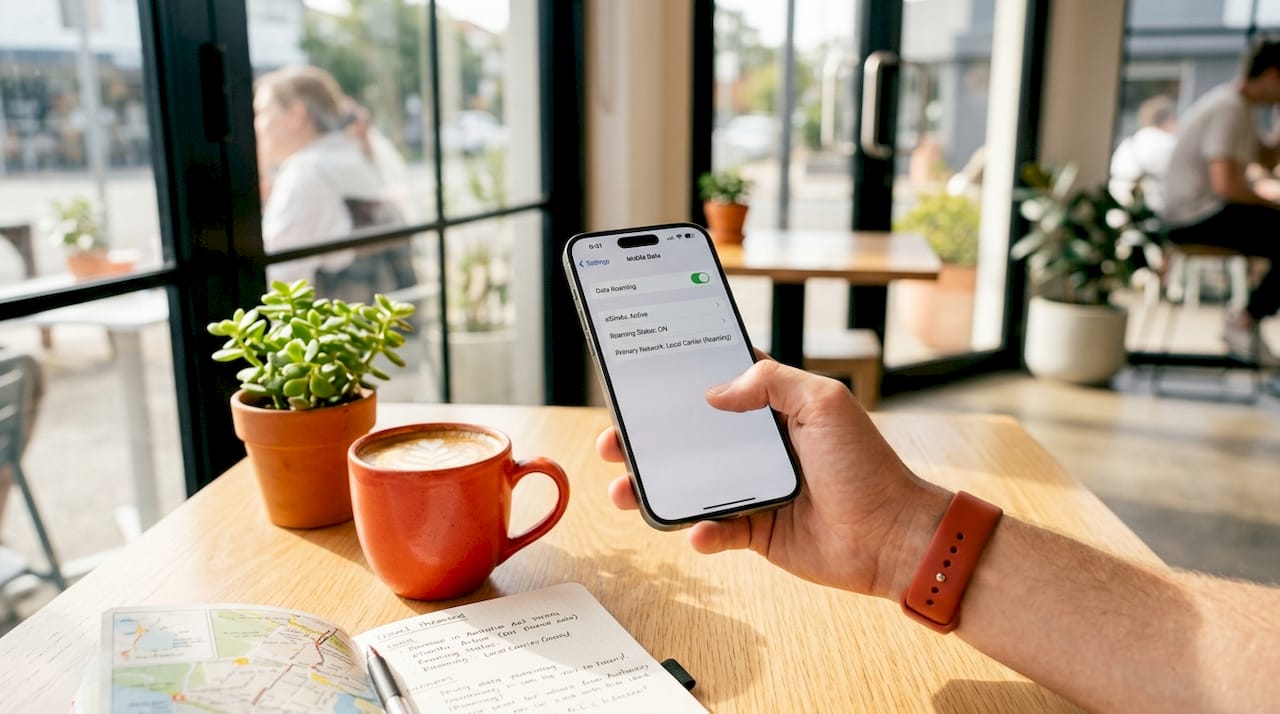
eSIM data roaming works by storing a carrier profile digitally inside your device and connecting to a foreign network when you arrive at your destination, exactly as a physical SIM would. Roaming on an eSIM behaves identically to roaming on a physical SIM card on iPhones. That means the same network handshakes, the same data speeds, and the same settings controls. The key difference is that you never touch a plastic card.
How eSIM activation works before you travel
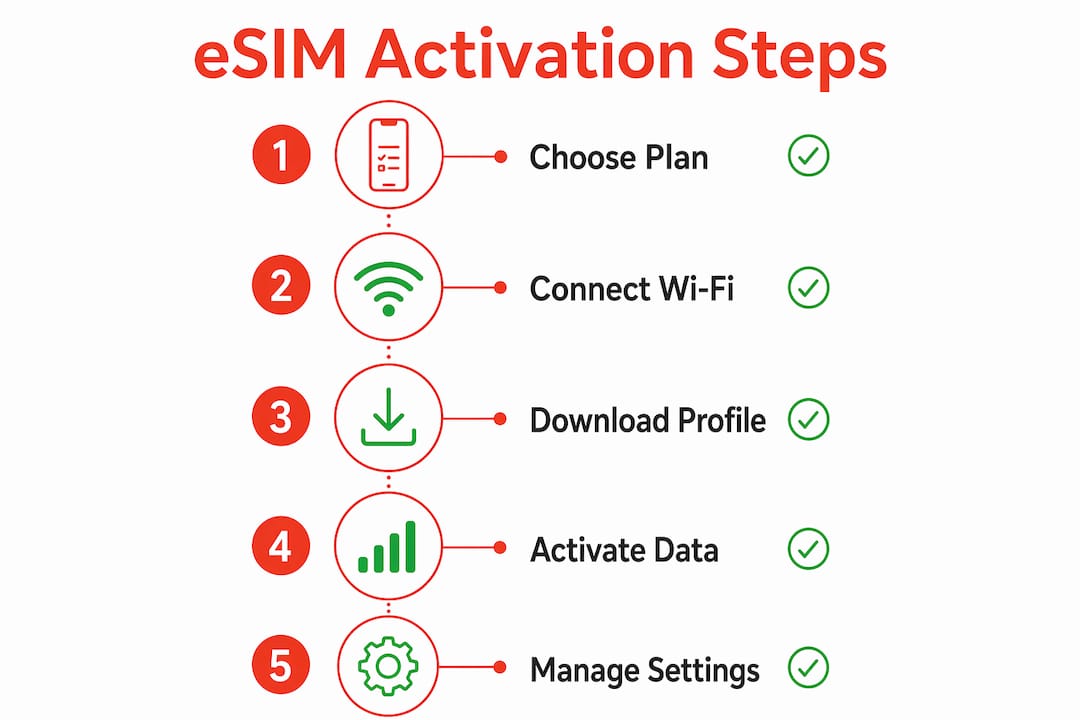
Activation happens through one of four methods, depending on your carrier and device:
- QR code scan. Your eSIM provider sends a QR code by email. Open Settings, tap “Add eSIM,” and scan the code. The carrier profile downloads in seconds.
- Carrier app. Some providers, including Esim4u, deliver profiles through a dedicated app that handles the download automatically.
- Manual entry. You type in an activation code and server address if a QR code is unavailable.
- Device transfer. On newer iPhones, you can transfer an eSIM from one device to another over Bluetooth without contacting the carrier.
eSIM setup requires Wi-Fi during activation, but once the profile is installed, mobile data works normally on any supported network. This is why downloading your travel eSIM profile at home before you leave is strongly recommended.
Pro Tip: Set up your travel eSIM on your home Wi-Fi the night before departure. Trying to activate at the airport on a weak public connection adds unnecessary stress.
Managing dual SIM lines on your phone
Most modern iPhones support dual SIM, meaning you can run your home SIM and a travel eSIM at the same time. Your home line stays active for incoming calls and SMS while the travel eSIM handles all your data. This is genuinely useful. You do not miss calls from your bank or family while still getting affordable local data rates abroad.
The critical setting here is which line handles cellular data. Go to Settings > Cellular > Cellular Data and select your travel eSIM line. Then disable Data Roaming on your home line to prevent it from connecting to foreign networks and generating charges.
eSIM vs physical SIM roaming: benefits and risks
eSIM data roaming offers clear advantages over traditional SIM roaming, but it also comes with a few settings traps that catch travellers off guard.
The benefits are real:
- No SIM swapping. eSIM eliminates the need to buy and swap physical SIM cards at your destination. You purchase a plan online, receive a QR code instantly, and activate from anywhere.
- Fixed, predictable costs. Local and global eSIM plans come with prepaid data allowances at fixed rates, so you know exactly what you are spending before you land.
- Security. Digital profiles cannot be lost, stolen, or damaged the way a physical SIM card can.
- Environmental benefit. No plastic card production or disposal required.
- Flexibility. You can hold multiple eSIM profiles on one device and switch between them as you move between countries.
The risks to watch:
- Leaving Data Roaming enabled on your home SIM line by accident is the most common and costly mistake travellers make. Your home carrier will charge standard international roaming rates the moment your phone connects to a foreign tower.
- Not checking device compatibility before purchase. Some older devices and carrier-locked phones do not support eSIM at all.
- Purchasing a plan that does not cover your specific destination. Always verify country coverage before buying.
The benefits of eSIM for travel go well beyond convenience. For frequent travellers, the ability to pre-purchase data plans for multiple countries and switch between them without visiting a shop is a genuine shift in how international connectivity works.
How to choose and activate the right eSIM plan
Choosing the right eSIM data plan comes down to three factors: where you are going, how much data you need, and how long you will be away.
Local vs global eSIM plans
| Plan type | Best for | Typical coverage | Cost profile |
|---|---|---|---|
| Local carrier eSIM | Single country trips | One country only | Lower cost per GB |
| Regional eSIM | Multi-country trips in one region | 5 to 30+ countries | Mid-range, good value |
| Global eSIM | Frequent or multi-region travel | 80 to 120+ countries | Higher cost, maximum flexibility |
A local plan from a Japanese carrier will give you the best rates if you are only visiting Japan. If you are moving through Southeast Asia across five countries in two weeks, a regional plan covering those destinations saves you from buying and managing five separate plans.
For travellers who move between continents or visit many countries in one trip, a global eSIM plan covering 120 or more countries removes the planning burden entirely.
Step-by-step activation
- Confirm your device is unlocked and supports eSIM on your carrier plan before purchasing.
- Purchase your plan from a provider like Esim4u. You receive a QR code by email, usually within minutes.
- On iPhone: go to Settings > Cellular > Add eSIM > Use QR Code.
- Scan the QR code. The profile downloads over Wi-Fi.
- Label the new line (for example, “Travel Data”) so you can identify it easily in settings.
- Set the travel eSIM as your default cellular data line.
- Disable Data Roaming on your home SIM line.
- Enable Data Roaming on your travel eSIM line.
Pro Tip: Check the validity period of your plan before activating. Some plans start counting down from the moment of activation, not from first use. Activate on the day you depart, not a week before.
For a full walkthrough of the eSIM installation process on Apple devices, Esim4u provides a dedicated setup guide.
How to manage eSIM data roaming safely and avoid charges
Managing your settings correctly is what separates a smooth trip from an unexpected bill. The most important toggle for travellers is disabling Data Roaming on the home line and enabling it only on the travel eSIM line. Many travellers get this backwards or forget one step.
Here is the correct sequence to follow when you land:
- Open Settings > Cellular.
- Tap your home SIM line. Turn Data Roaming off.
- Go back and tap your travel eSIM line. Turn Data Roaming on.
- Confirm that Cellular Data is set to your travel eSIM line.
- Toggle aeroplane mode on and off to force your phone to reconnect to a local network.
Connectivity problems with eSIM roaming almost always relate to incorrect per-line settings rather than a fault with the eSIM installation itself. If your data is not working, check these settings before assuming the eSIM is broken.
Additional settings to protect your data budget
Low Data Mode reduces background app activity and automatic updates. Enable it on your travel eSIM line under Settings > Cellular > [Travel eSIM Line] > Low Data Mode.
Disable automatic SMS fallback if your plan does not include SMS. Some iPhones will attempt to send iMessages as standard SMS when Wi-Fi is unavailable, which can generate charges on your home line.
Monitor your data usage regularly. On iPhone, go to Settings > Cellular and scroll down to see per-app data consumption. Reset the statistics at the start of your trip so you get an accurate reading.
Pro Tip: Turn off background app refresh for data-heavy apps like Instagram, Google Photos, and Dropbox. These apps sync silently and can consume hundreds of megabytes without you opening them.
Key takeaways
eSIM data roaming works identically to physical SIM roaming but removes the need for a plastic card, giving travellers instant, flexible, and cost-predictable connectivity abroad.
| Point | Details |
|---|---|
| eSIM roaming equals physical SIM roaming | Behaviour, speeds, and settings are identical once the profile is installed. |
| Dual SIM management is critical | Disable Data Roaming on your home line and enable it only on your travel eSIM line. |
| Activate over Wi-Fi before you depart | Download your eSIM profile at home to avoid connectivity issues on arrival. |
| Match your plan type to your trip | Use local plans for single countries, regional or global plans for multi-country travel. |
| Settings errors cause most problems | If data is not working, check per-line roaming toggles before troubleshooting the eSIM itself. |
Why I think most travellers overcomplicate eSIM roaming
After years of watching travellers stress over connectivity, the pattern is clear. The technology is not the problem. The settings are.
Most people who tell me eSIM “did not work” for them had simply left Data Roaming enabled on their home line or forgotten to set their travel eSIM as the default data line. These are two-tap fixes. The eSIM itself was fine the whole time.
What I genuinely appreciate about eSIM is the pre-trip control it gives you. You can research plans, compare coverage maps, purchase, and activate before you leave your lounge chair. That is a different experience from landing in a foreign airport at midnight and hunting for a SIM card vendor.
My advice for frequent travellers is to keep a regional eSIM profile on your device even between trips. Some providers allow you to top up or reactivate existing profiles, which means your next trip to the same region requires almost no setup at all. The types of travel eSIM plans available in 2026 have expanded significantly, and the pricing has become genuinely competitive with local SIM cards in most markets.
The one thing I would caution against is buying the cheapest global plan without checking coverage in your specific destination. A plan that covers 120 countries sounds impressive until you discover your destination is not one of them. Always verify the coverage list before purchasing.
— Peter
Get connected before you land with Esim4u
Esim4u offers prepaid eSIM plans covering destinations across Asia, Europe, the Americas, and beyond, with instant QR code delivery after purchase. You can browse, compare, and buy an international eSIM online in minutes, with no physical card to wait for and no shop to visit. Plans are available for single countries, regional bundles, and global coverage across 120 or more countries. Activate your plan at home over Wi-Fi, set your travel eSIM as your default data line, and arrive at your destination already connected. If you are heading somewhere across the region, the Asia eSIM plan covers 12 countries with 20GB of data, making it a practical choice for multi-stop trips through Asia.
FAQ
What is eSIM data roaming?
eSIM data roaming is the process of connecting to a foreign mobile network using a digital carrier profile stored on your device, with no physical SIM card required. It works identically to physical SIM roaming in terms of network behaviour and settings.
Do I need Wi-Fi to set up an eSIM for travel?
Yes. eSIM activation requires a Wi-Fi connection to download the carrier profile to your device. Once installed, the eSIM operates on mobile data without Wi-Fi.
How do I avoid roaming charges on my home SIM when using a travel eSIM?
Turn off Data Roaming on your home SIM line in Settings > Cellular, then enable Data Roaming only on your travel eSIM line. This prevents your home carrier from connecting to foreign networks and generating charges.
Is eSIM available on all smartphones?
eSIM is supported on iPhone XS and later, Google Pixel 3 and later, and Samsung Galaxy S20 and later, among others. Your device must also be carrier-unlocked to use a third-party travel eSIM.
Can I use my regular phone number while roaming on a travel eSIM?
Yes. With dual SIM enabled, your home line remains active for calls and SMS while your travel eSIM handles data. You receive calls and messages on your regular number without paying data roaming rates on your home plan.
Related Blogs
Explore the World Without Roaming Worries



100% Money Back Guarantee
If you cancel your trip or experience tech issues that we can’t fix; we’ll refund you 100%.