


eSIM for student travel explained: 2026 guide
An eSIM is a digital SIM profile embedded directly into your device, letting you activate local mobile data plans abroad without touching a physical SIM card. For students heading overseas to study, that means you can land in a new country and get connected within minutes. Providers like Airalo, Saily, and Jetpac offer prepaid travel plans built around this technology. Understanding eSIM for student travel explained properly means knowing not just how to activate one, but how to use it alongside your home SIM to avoid losing access to banking apps, university portals, and OTP verification codes.
How does eSIM activation work for student travellers?
Activating a travel eSIM is straightforward once you know the steps. The process works the same way whether you are heading to Europe for a semester or spending a year in Japan.
Here is how activation works on most student devices:
- Purchase your eSIM plan from a provider like Airalo or Esim4u before you travel. You receive a QR code or SM-DP+ activation details by email.
- Connect to Wi-Fi at home or at the airport before departure. You need a stable connection to download the profile.
- Open your phone’s settings and navigate to the mobile or cellular section. Select “Add eSIM” or “Add a plan.”
- Scan the QR code or enter the SM-DP+ server address and activation code manually. Your device contacts the provisioning server and downloads the profile securely.
- Label your new eSIM clearly, for example “Travel Data,” so you can manage it easily alongside your home SIM.
- Set your data default to the eSIM once you land, while keeping your home SIM active for calls and SMS.
Activation typically takes 5–10 minutes on an iPhone with a stable connection. That speed means you can set everything up the night before your flight rather than scrambling at the airport.
iPhones from the XR model onwards support eSIM. Most recent Samsung Galaxy and Google Pixel devices are also compatible. One critical check: your phone must be carrier unlocked. A locked device will reject the eSIM profile from a different operator.

Pro Tip: Activate your eSIM at home before you travel. Airport Wi-Fi is unreliable, and expired QR codes or missing connectivity are the two most common causes of activation failure.
Why do students use dual SIM setups when studying abroad?
Most travel eSIMs are data only. They give you mobile internet but no local phone number, and they cannot receive SMS messages. That creates a real problem for students.
Here is why keeping your home SIM active matters:
- Banking apps use SMS codes to verify logins. Without your home number, you get locked out.
- University portals often send OTP codes to your registered mobile number for two-factor authentication.
- Visa and accommodation services may send confirmation texts to the number on file.
- Family and friends back home can still reach you on your regular number without international charges on their end.
Dual SIM capability lets you run your home SIM for voice and SMS while the eSIM handles all your data. Your phone manages both lines at once. You get the cheap local data rates of the eSIM without cutting off the communications your home number handles.
The risk of ignoring this is real. Students who disable or remove their home SIM abroad regularly find themselves locked out of internet banking at the worst possible moment. A dual SIM setup costs nothing extra if you already have both a physical SIM slot and eSIM support on your device.
Pro Tip: Before you leave, check which apps on your phone use SMS verification. Log into each one while you are still at home so you can confirm your home number is registered correctly.
What are the best eSIM plan strategies for students abroad?
The most cost-effective approach for students is a two-stage plan. Buy a small arrival eSIM to cover your first week, then switch to a local SIM or longer-term plan once you have settled in.
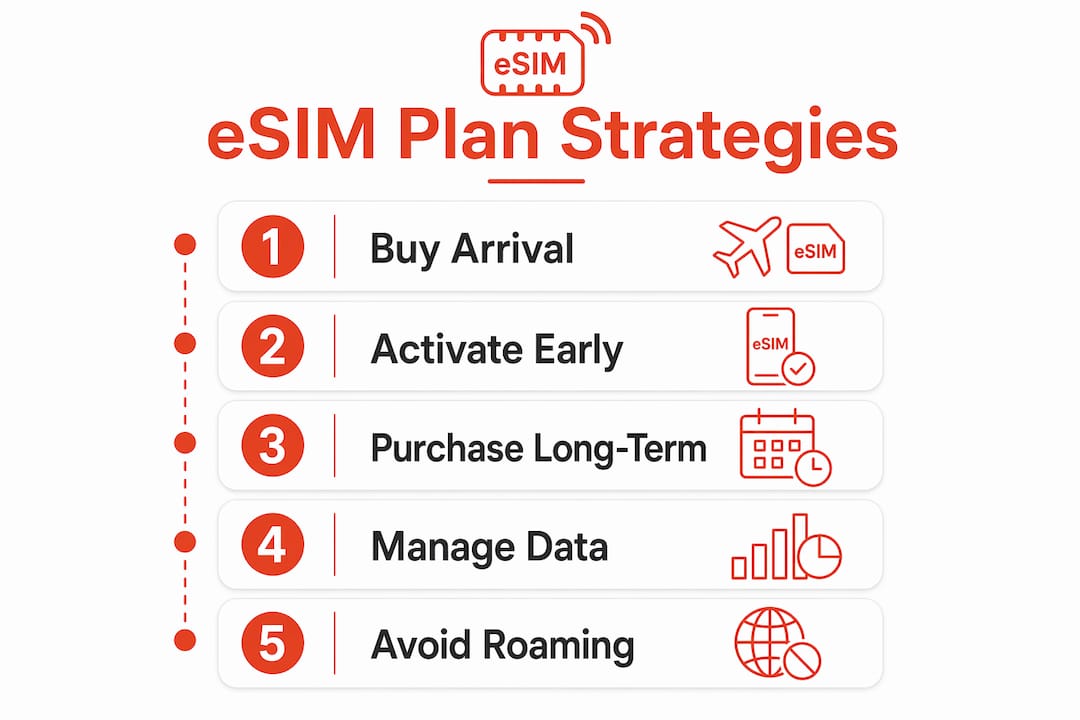
This two-stage strategy prevents the expensive mistake of arriving with no data and paying roaming rates on your home plan. It also gives you time to compare local carriers and find the best value for a longer stay.
Comparing popular eSIM providers for student travel
| Provider | Coverage | Plan type | Best for |
|---|---|---|---|
| Airalo | 200+ countries | Data only, prepaid | Short stays, arrival week |
| Saily | 150+ countries | Data only, prepaid | Budget-conscious students |
| Jetpac | Select regions | Data only, prepaid | Specific destination focus |
| Esim4u | Popular study destinations | Data only, prepaid | Australian students heading abroad |
When choosing a plan, keep these points in mind:
- Short arrival plans (1–7 days) are ideal for your first week. They are affordable and get you online instantly.
- Local SIMs are usually cheaper for stays longer than a month. They often include calls, SMS, and a local number.
- Topping up your eSIM is a good backup option if a local SIM takes time to organise after arrival.
- Regional eSIMs cover multiple countries in one plan, which suits students who travel between countries during semester breaks.
eSIMs can store multiple profiles and many devices hold up to eight at once. That flexibility means you can keep your arrival eSIM as a backup even after switching to a local plan. You can find a full breakdown of international data plan types to help you decide which structure suits your study schedule.
How does eSIM remote provisioning work?
The technology behind eSIM activation is called GSMA Remote SIM Provisioning. Understanding it helps you troubleshoot problems and trust the process.
Three components make it work:
| Component | Role |
|---|---|
| SM-DP+ server | Stores and delivers encrypted eSIM profiles to your device |
| Local Profile Assistant (LPA) | Software on your phone that manages the download and installation |
| eUICC chip | The physical chip in your device that stores the eSIM profile securely |
GSMA Remote SIM Provisioning allows devices to securely download encrypted eSIM profiles via SM-DP+ servers. The encryption means your mobile network authentication keys stay protected throughout the process. No one can intercept your profile during download.
The Local Profile Assistant validates GSMA certificates and sets up a secure encrypted channel to the eUICC chip before the profile arrives. That validation step is why activation fails when your QR code has expired. The code is effectively a digital key. An expired key cannot open the door to the provisioning server.
Activation typically completes in 2–3 minutes with good connectivity, after which the eSIM functions exactly like a physical SIM. The profile sits on your eUICC chip and can be switched on or off from your phone’s settings at any time.
Pro Tip: If activation fails, do not scan the QR code again immediately. Contact your provider first. Some QR codes are single-use, and scanning a failed code twice can invalidate it permanently.
Key takeaways
An eSIM gives students instant, flexible mobile connectivity abroad, but a dual SIM setup is the only reliable way to maintain both local data and home number access at the same time.
| Point | Details |
|---|---|
| Activate before you fly | Set up your eSIM at home on stable Wi-Fi to avoid airport activation problems. |
| Keep your home SIM active | Travel eSIMs are data only; your home SIM handles OTPs, banking, and SMS. |
| Use a two-stage plan | Buy a short arrival eSIM first, then switch to a local SIM for longer stays. |
| Check device compatibility | Your phone must be carrier unlocked and support eSIM, such as iPhone XR or later. |
| Store multiple profiles | Most devices hold several eSIM profiles, so keep your arrival plan as a backup. |
Esim4u has plans ready for your study destination
Esim4u offers prepaid travel eSIM plans for popular student study destinations, with straightforward online purchase and fast delivery to your inbox. You can browse destination-specific eSIM plans covering countries across Asia, Europe, and beyond. Step-by-step installation guides are available for both iPhone setup and Android devices, so you are never left guessing. Plans are prepaid, transparent on data allowances, and ready to activate before you board your flight. If you want a hassle-free way to get connected on arrival, Esim4u is a reliable place to start.
FAQ
What is an eSIM and how does it work for students?
An eSIM is a digital SIM profile stored on a chip inside your phone that lets you activate mobile data plans without a physical SIM card. Students use it to get connected instantly on arrival in a new country.
Do travel eSIMs include calls and SMS?
Most travel eSIMs are data only and do not include a local phone number. Students should keep their home SIM active alongside the eSIM to receive calls and SMS verification codes.
Which phones support eSIM for travel?
iPhones from the XR model onwards support eSIM, as do most recent Samsung Galaxy and Google Pixel devices. Your phone must also be carrier unlocked for a travel eSIM to work.
Why does eSIM activation fail sometimes?
Activation failures are most commonly caused by expired QR codes, a missing Wi-Fi connection, or a carrier-locked device. Always activate on a stable network before you travel.
Is an eSIM cheaper than roaming on my home plan?
A prepaid travel eSIM is almost always cheaper than international roaming on an Australian home plan. For stays longer than a month, a local SIM card is typically the most cost-effective option of all.
Related Blogs
Explore the World Without Roaming Worries



100% Money Back Guarantee
If you cancel your trip or experience tech issues that we can’t fix; we’ll refund you 100%.