


What does eSIM download mean for travellers?
An eSIM download is the digital installation of a mobile network profile onto your device’s embedded SIM chip, replacing the need for a physical SIM card entirely. When you “download an eSIM,” your phone contacts a secure server, fetches a small encrypted file, and installs it directly onto the chip soldered inside your device. Understanding what does eSIM download mean is the first step to travelling without SIM card stress. The process takes as little as 30 seconds and works anywhere you have Wi-Fi.
What does eSIM download mean, step by step?
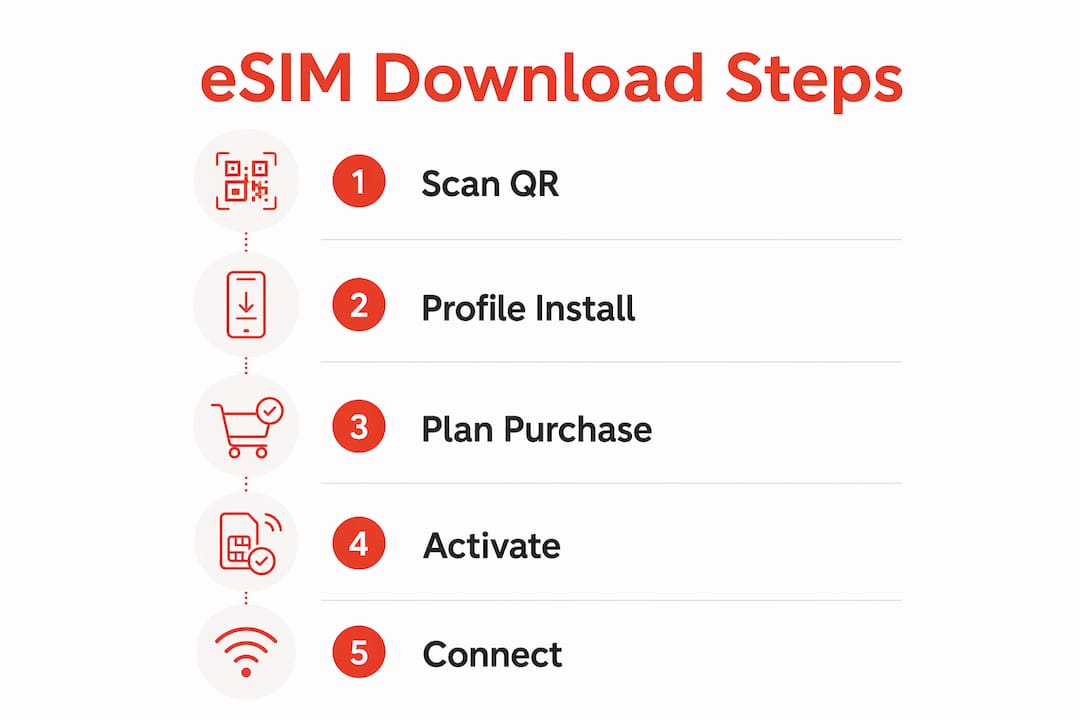
Downloading an eSIM is a five-stage process that moves from a QR code scan to a live network connection. Each stage is automatic, but knowing what happens helps you troubleshoot if something goes wrong.
-
Receive your QR code or activation link. Your eSIM provider, such as Esim4u, emails you a QR code after purchase. This code contains the address of a secure server and a unique token tied to your plan.
-
Scan the code on your device. On iPhone, go to Settings > Mobile Data > Add eSIM. On Android, the path varies by manufacturer but is typically Settings > Connections > SIM Manager. Your device reads the server address from the QR code.
-
Device contacts the SM-DP+ server. The SM-DP+ server handshake is the technical core of the process. SM-DP+ stands for Subscription Manager Data Preparation Plus. It is the secure server that holds your carrier profile and verifies your device before sending anything.
-
Encrypted profile is downloaded and installed. The carrier profile download is a small file, typically between 50 KB and 200 KB. It contains authentication keys, network credentials, and configuration data. Your device installs it into the eUICC chip, which is the embedded chip that stores eSIM profiles.
-
Automatic activation and network authentication. Once installed, your device registers with the carrier’s network. You are connected. The full process takes 30 seconds to 5 minutes depending on your Wi-Fi speed and the carrier’s server load.
Pro Tip: Scan your QR code before you board your flight. Activating at the airport on slow public Wi-Fi adds unnecessary stress. Do it at home the night before you travel.
What exactly gets downloaded to your device?
The downloaded content is a carrier profile, not a data plan. This distinction matters more than most travellers realise.
The carrier profile contains network credentials and settings that let your device authenticate with a specific mobile network. Think of it as a digital key. Without it, your device cannot talk to the network. With it, your device knows exactly which network to connect to and how to prove it is authorised.
Here is what the profile includes and what it does not include:
- Authentication keys. These prove your device’s identity to the carrier’s network.
- Network configuration data. This tells your phone which frequencies and protocols to use.
- APN settings. These configure your mobile data connection automatically.
- Carrier branding and settings. Some profiles include visual voicemail or carrier-specific features.
What the profile does not include is your actual data allowance. The eSIM profile download is separate from the commercial purchase of a mobile data plan. You buy the plan from a provider like Esim4u. The download is the technical step that makes the plan usable on your specific device. This is also why downloading the profile is often free even when the data plan itself costs money.
Understanding the eSIM data plan types available helps you match the right plan to the profile you have just downloaded.
Why downloading an eSIM beats a physical SIM for travellers
The practical advantages of the eSIM download process are significant for anyone travelling internationally. The comparison below shows where eSIM consistently wins.

| Feature | Physical SIM | eSIM download |
|---|---|---|
| Activation speed | Hours to days (shipping or shop visit) | 30 seconds to 5 minutes |
| Requires physical handling | Yes, card must be inserted | No, installed digitally |
| Security against SIM swap fraud | Lower, card can be cloned or stolen | Higher, hardware-level encryption |
| Switch between plans | Requires swapping cards | Done in settings within minutes |
| Works before you land | No | Yes, activate from home |
The security advantage is real. Because the eSIM profile is locked to the hardware of your specific device and uses encryption, it is far harder to clone or intercept than a physical SIM card. SIM swapping fraud, where criminals convince a carrier to transfer your number to a new SIM, is much harder to execute against an eSIM.
Switching between eSIM profiles takes minutes and requires no physical card change. A traveller moving from Australia to Japan to Europe can hold separate local profiles on one device and switch between them in settings. No fumbling with tiny cards, no risk of losing them in a hotel room.
Pro Tip: Buy your travel eSIM before you leave Australia. Check out how eSIM activation works for travellers so you arrive at your destination already connected.
Common problems when downloading and installing an eSIM
Most eSIM download failures come down to a handful of avoidable mistakes. Knowing them in advance saves you a frustrating hour at the airport.
-
Using cellular data instead of Wi-Fi. A stable Wi-Fi connection is mandatory for the eSIM download. You cannot use the cellular data from the SIM you are activating to complete the download. The SM-DP+ server handshake requires a separate, working internet connection. Use home Wi-Fi or a trusted network.
-
Device not compatible with eSIM. Not every phone supports eSIM. Most flagship devices from Apple (iPhone XS and later), Samsung Galaxy S20 and later, and Google Pixel 3 and later support eSIM. Check your device specifications before purchasing a plan.
-
QR code scanned more than once. Most eSIM QR codes are single-use. Scanning the same code a second time after a failed installation will not work. Contact your provider for a replacement code.
-
Software not up to date. An outdated operating system can cause the eSIM installation to fail silently. Update your iOS or Android software to the latest version before attempting the download.
-
Transferring an eSIM between devices. eSIM profiles are tied to the device they were installed on. You cannot simply move a profile from one phone to another the way you would a physical SIM. To switch devices, you need to request a new profile from your provider. Apple’s eSIM transfer feature (available on newer iPhone models) is an exception, but it requires both devices to be present and connected.
For device-specific guidance, Esim4u has detailed setup pages for both Android eSIM installation and Apple device setup.
Key takeaways
An eSIM download installs a small encrypted carrier profile onto your device’s embedded chip, giving you instant mobile connectivity without a physical SIM card.
| Point | Details |
|---|---|
| What gets downloaded | A 50–200 KB encrypted carrier profile containing authentication keys and network credentials. |
| Download vs. data plan | The profile download is a technical step, separate from purchasing your mobile data plan. |
| Wi-Fi is required | You must use a stable Wi-Fi connection to complete the download. Cellular data will not work. |
| Security advantage | eSIM profiles use hardware-level encryption, making them more secure than physical SIM cards. |
| Switching profiles | You can switch between multiple eSIM profiles in settings within minutes, with no physical card needed. |
Get connected instantly with Esim4u
Esim4u makes the eSIM download and activation process straightforward for Australian travellers. Plans cover 120+ countries worldwide, so whether you are heading to Europe, Asia, or the Americas, you get a compatible plan delivered by QR code to your inbox. Purchase online, receive your QR code instantly, and follow the step-by-step setup for your iPhone eSIM installation or Android device. No shop visits, no waiting for a card in the post. Activation support is available if you hit a snag. Esim4u keeps the process transparent so you spend less time troubleshooting and more time travelling.
FAQ
What does eSIM download mean on my phone?
An eSIM download means your phone contacts a secure server and installs an encrypted carrier profile onto its embedded chip. This profile gives your device the credentials to connect to a mobile network without a physical SIM card.
Does downloading an eSIM cost money?
Downloading the eSIM profile itself is typically free. The cost comes from purchasing the mobile data plan separately, which is a commercial transaction distinct from the technical download process.
How long does an eSIM download take?
The download takes 30 seconds to 5 minutes depending on your Wi-Fi speed and server load. A stable Wi-Fi connection gives you the fastest result.
Why does eSIM download need Wi-Fi?
The eSIM download requires a stable Wi-Fi connection because you cannot use the cellular data from the SIM being activated to complete the installation. Wi-Fi provides the separate internet connection needed to reach the SM-DP+ server.
Can I download an eSIM on any phone?
No. Your device must support eSIM technology. Most flagship iPhones from the XS onwards, Samsung Galaxy S20 and later, and Google Pixel 3 and later are compatible. Check your device specifications before purchasing a plan.
Related Blogs
Explore the World Without Roaming Worries



100% Money Back Guarantee
If you cancel your trip or experience tech issues that we can’t fix; we’ll refund you 100%.