


eSIM for frequent international travellers: 2026 guide
An eSIM for frequent international travellers is a digital SIM profile that delivers instant, flexible mobile data access across multiple countries without swapping physical SIM cards. Unlike a traditional SIM, an eSIM works by downloading a carrier profile onto your phone’s embedded chip after scanning a QR code or entering activation details. You get connected to a local network in minutes. Providers like Airalo and Saily have made this process accessible to everyday travellers, not just tech enthusiasts. If you cross borders regularly, understanding why eSIM works overseas is the single most useful thing you can do before your next trip.
Which eSIM plan suits a frequent international traveller?
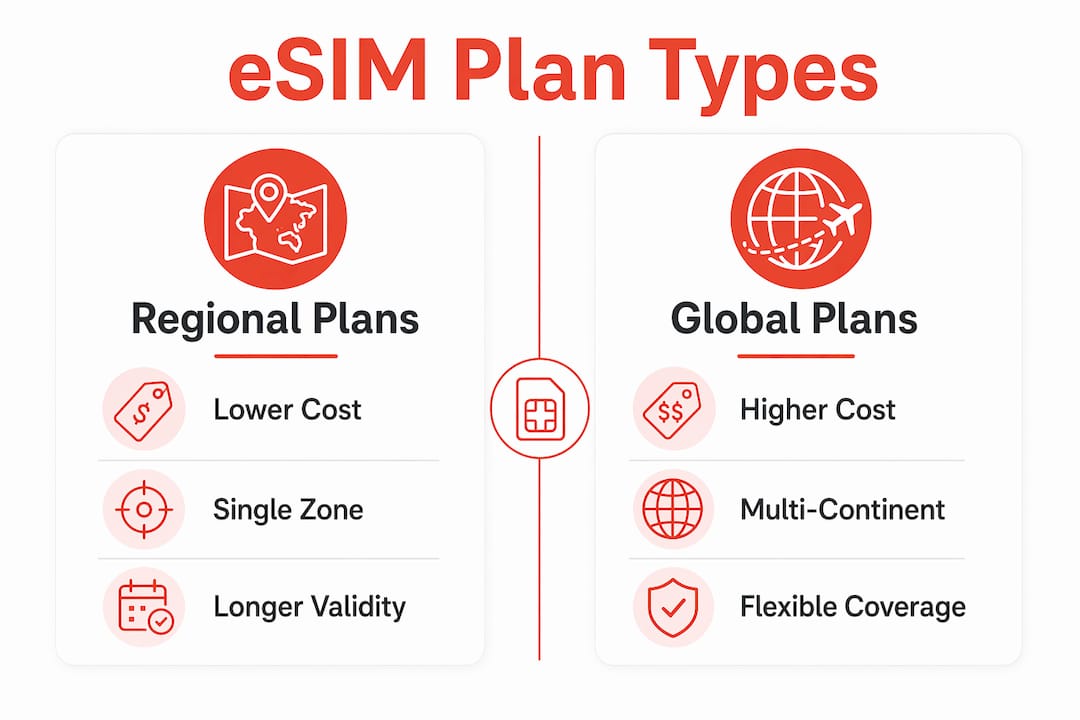
Choosing the right plan is the most important decision you will make as a frequent flyer. Frequent travellers must decide between regional plans covering multiple countries within one area, and global plans suited to multi-continental travel. Each option has a different cost structure and coverage logic.
Regional plans cover a defined zone, such as Europe or Southeast Asia. They are cheaper per gigabyte and ideal if most of your travel stays within one region. A Europe regional plan, for example, might cover 30+ countries at a fraction of what a global plan costs.

Global plans cover multiple continents, sometimes 130 or more countries. They cost more per gigabyte but save you the hassle of buying a new plan every time you land somewhere new. For travellers who hop between Asia, Europe, and the Americas in a single month, a global plan is the practical choice.
Here is a quick comparison to help you decide:
| Feature | Regional Plan | Global Plan |
|---|---|---|
| Coverage | One region (e.g. Europe, Asia) | Multi-continent, 100+ countries |
| Cost per GB | Lower | Higher |
| Best for | Frequent trips within one region | Multi-continent itineraries |
| Plan validity | 7–30 days typical | Up to 365 days available |
| Hotspot support | Usually included | Usually included |
| Convenience | Buy per region | One plan, many destinations |
Beyond coverage, check three things before purchasing any plan:
- Plan validity: Short trips need 7-day plans. Long-haul travellers benefit from 30-day or annual plans.
- Data caps: Some plans throttle speeds after a set amount of data. Know your usage before you buy.
- Hotspot capability: If you need to share data with a laptop or tablet, confirm the plan supports tethering.
Pro Tip: If you travel to the same region repeatedly, buy a regional plan with a longer validity period rather than multiple short plans. You will save money and avoid repeated activations.
You can also compare eSIM data plan types to get a clearer picture of which structure suits your travel pattern before committing.
Is your device ready for an international eSIM?
Before you purchase any plan, confirm your device is compatible and unlocked. Not every phone supports eSIM, and a locked device will reject any profile you try to install.
Check these four things before you travel:
- eSIM compatibility: Most iPhone models from the XS onwards, Samsung Galaxy S20 and later, and Google Pixel 3 and later support eSIM. Check your device settings under “Mobile Data” or “SIM & Network” to confirm.
- Carrier unlock status: A phone locked to a local carrier will not accept a foreign eSIM profile. Contact your home carrier to unlock it before you leave.
- Stable internet connection: Installing an eSIM requires a compatible device and a stable internet connection. The profile download is typically 100–500 KB, but an unstable connection causes activation failures.
- QR code or activation link: Your eSIM provider will send this by email after purchase. Save it somewhere accessible, such as a screenshot or printed copy.
Pro Tip: Install your eSIM at home on your own Wi-Fi before you travel. Airport Wi-Fi causes activation errors far more often than home connections, and troubleshooting at the gate is stressful and avoidable.
This advice applies equally to an eSIM for a senior international traveller. Completing setup in a calm, familiar environment removes the pressure of doing it on arrival in a foreign country.
How do you install an eSIM on iPhone, samsung, or pixel?
The installation process is straightforward across all major devices. Follow these steps carefully and do not rush the process.
- Open your device settings. On iPhone, go to Settings > Mobile Data > Add eSIM. On Samsung, go to Settings > Connections > SIM Manager > Add eSIM. On Google Pixel, go to Settings > Network & Internet > SIMs > Add eSIM.
- Scan the QR code provided by your eSIM provider, or enter the activation details manually if your device does not have a camera option.
- Wait for the profile to install. The eSIM activation is a multi-step process involving profile provisioning on the carrier’s backend server, installation on the embedded SIM, and network registration. This can take 1–3 minutes.
- Do not toggle settings during installation. Switching airplane mode on and off, or turning data on and off, interrupts the activation sequence and causes failures. Wait until the process completes.
- Label your eSIM profile. Most devices let you rename the profile. Use something clear like “Europe Trip” or “Asia Data” so you can identify it quickly when switching.
- Enable data roaming. After installation, go to your mobile data settings and enable roaming for the eSIM line. Without this step, the profile will not connect when you land abroad.
- Test the connection before you leave. Send a message, load a webpage, or check your data signal to confirm everything is working.
The most common reason installations fail is impatience. The provisioning step contacts the carrier’s SM-DP+ server, installs an encrypted profile, and registers on the network. Each step takes time. Let it run.
How do you manage multiple eSIMs while travelling?
Managing multiple eSIM profiles is where frequent travellers gain a real advantage over those still using physical SIMs. Some phones store up to eight or more eSIM profiles simultaneously, letting you switch plans instantly without buying new cards.
Here is how to manage your profiles effectively:
- Keep a long-validity global eSIM installed at all times. Some long-validity plans cover 130+ countries for up to one year. This acts as your backup connection when you land somewhere new and have not yet activated a regional plan.
- Switch profiles based on your location. Use a regional plan for your primary data when you are settled in one area. Switch to your global backup for short border crossings or layovers.
- Check your default data line. Devices may prioritise physical SIMs or previously installed profiles unless you manually select the correct eSIM. Always verify which line is active after switching.
- Disable profiles you are not using. An inactive profile left enabled can cause your device to attempt connections on the wrong network, draining your battery and causing confusion.
Pro Tip: Before every trip, open your SIM settings and confirm which profile is set as your primary data line. This 30-second check prevents the most common connectivity problem frequent travellers report.
Improved 5G network support paired with broader regional and global plan selections means your options in 2026 are better than ever. The technology has matured, and the plans have become more competitive.
Key takeaways
Choosing the right eSIM plan, preparing your device in advance, and managing your profiles carefully are the three steps that separate stress-free international travel from avoidable connectivity problems.
| Point | Details |
|---|---|
| Choose the right plan type | Match regional plans to single-zone travel and global plans to multi-continent itineraries. |
| Prepare your device at home | Confirm compatibility, unlock status, and install your eSIM on stable Wi-Fi before departure. |
| Follow the installation sequence | Wait 1–3 minutes during activation and avoid toggling settings to prevent failures. |
| Store a global backup eSIM | Keep a long-validity global plan installed to cover unexpected destinations and short layovers. |
| Check your active data line | Manually verify which eSIM profile is set as primary after every switch to avoid connection errors. |
Ready to travel connected? Esim4u has you covered
Esim4u makes it easy to find and purchase the right international travel eSIM for your next trip. Whether you need a regional plan for a European circuit or a global plan for a multi-continent itinerary, Esim4u offers instant activation and transparent pricing with no hidden fees. Browse specialised eSIM options tailored to specific regions and traveller types, or head straight to the Esim4u store to compare and buy your plan in minutes. Setup is fast, support is available, and your connection will be ready before you leave home.
FAQ
What is an eSIM and how does it work for travel?
An eSIM is a digital SIM profile downloaded onto your phone’s embedded chip after scanning a QR code or entering activation details. It connects you to a local carrier network without needing a physical SIM card.
How do i choose between a regional and global eSIM plan?
Choose a regional plan if most of your travel stays within one area, such as Europe or Southeast Asia. Choose a global plan if you travel across multiple continents in a single trip or month.
Can i have more than one eSIM on my phone at the same time?
Yes. Most modern smartphones store up to eight or more eSIM profiles simultaneously, letting you switch between plans based on your location without purchasing new cards.
Why is my eSIM not connecting after installation?
The most common cause is that data roaming is not enabled for the eSIM line, or the wrong profile is set as the primary data line. Check your mobile data settings and manually select the correct eSIM profile.
Is an eSIM suitable for a senior international traveller?
Yes. The process is straightforward when completed at home on stable Wi-Fi before departure. Most providers send a QR code by email, and installation takes only a few minutes on compatible devices.
Related Blogs
Explore the World Without Roaming Worries



100% Money Back Guarantee
If you cancel your trip or experience tech issues that we can’t fix; we’ll refund you 100%.