


Use eSIM without international plan: 2026 travel guide
You can use an eSIM without an international plan by downloading a local or regional data profile to your carrier-unlocked smartphone, giving you full data access abroad without paying your home carrier’s roaming rates. This approach, known in the industry as a travel eSIM setup, requires a compatible device, a Wi-Fi connection before departure, and a few simple settings changes. The result is affordable, reliable data in over 120 countries without touching your existing phone plan. Esim4u makes this process straightforward for Australian travellers heading anywhere from Tokyo to Tuscany.
What do you need before using an eSIM without an international plan?
Getting set up correctly before you leave is the most important step. Skip one prerequisite and you could land overseas with no data at all.

Device requirements
Your phone must meet three conditions to use a travel eSIM:
- Carrier-unlocked. Locked devices cannot connect to international eSIM networks. Contact your home carrier to unlock your phone before you travel. Most Australian carriers unlock devices for free once your contract is complete.
- eSIM-compatible. Most modern smartphones support eSIM, including iPhone XS and later, Google Pixel 3 and later, and Samsung Galaxy S20 and later. Check your device settings under “Mobile” or “SIM” to confirm.
- Dual SIM capable. Most modern smartphones support dual SIM with eSIM, meaning you keep your Australian number active on your physical SIM while the travel eSIM handles all your data. You get calls and texts on your home number without paying roaming rates for data.
What you need to prepare
| Requirement | Why it matters |
|---|---|
| Carrier-unlocked phone | Without this, the eSIM profile will not connect to overseas networks |
| Wi-Fi connection | You need Wi-Fi to download the eSIM profile before or during travel |
| Compatible eSIM plan | Choose a plan that covers your destination country or region |
| QR code or app access | Most providers deliver the eSIM profile via QR code or a dedicated app |
| Data roaming settings | You must enable roaming on the travel eSIM and disable it on your home SIM |
Choosing the right plan
Single-country plans work well for straightforward trips. For multi-country travel, regional eSIM plans cover multiple destinations under one purchase, so you do not need to buy and activate a new plan at every border. This saves time and removes the risk of losing connectivity between countries.
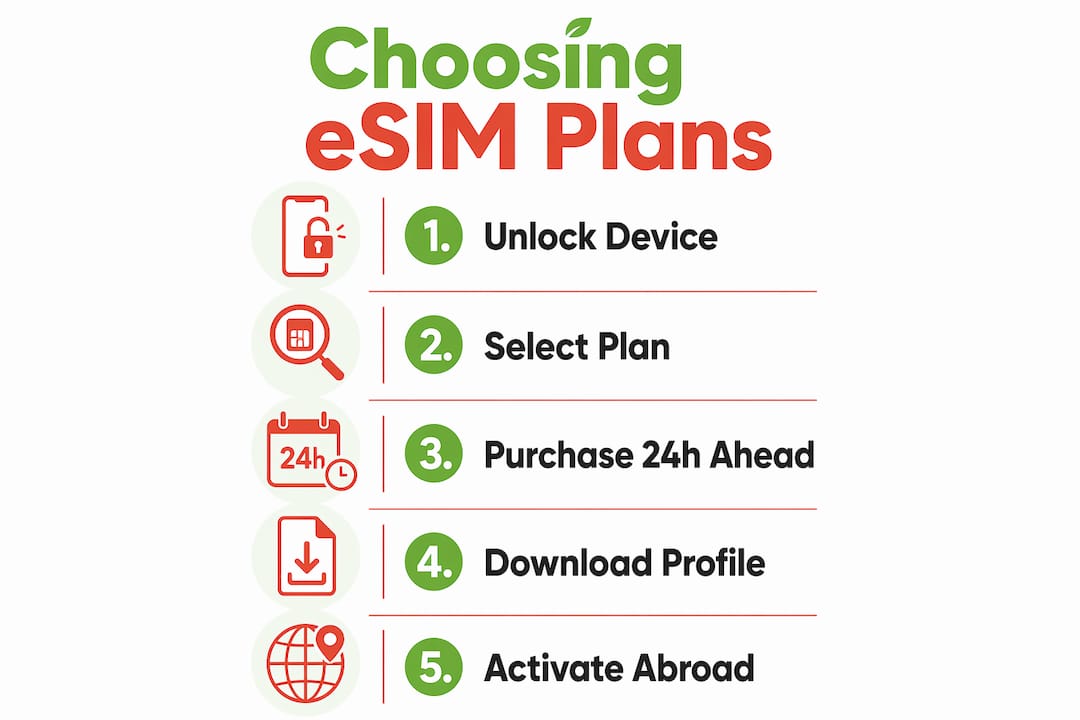
Pro Tip: Buy your eSIM plan at least 24 hours before departure. This gives you time to download the profile on your home Wi-Fi and troubleshoot any issues before you are at the airport.
How to install and activate a travel eSIM on your device
The installation process takes about five minutes. Follow these steps in order for the best result.
Step-by-step setup
-
Purchase your eSIM plan. Buy from a reputable provider like Esim4u. You will receive a QR code by email or through an app.
-
Connect to Wi-Fi. Downloading the eSIM profile requires a stable internet connection. Use your home Wi-Fi before departure whenever possible.
-
Install the eSIM profile. On iPhone, go to Settings > Mobile Data > Add eSIM > Use QR Code. On Android, go to Settings > Network > SIM > Add eSIM, then scan the QR code. Full device-specific instructions are available for Android setup and iPhone setup.
-
Label your eSIMs. Name your travel eSIM something clear, like “Travel Data,” so you can identify it quickly in settings.
-
Set the travel eSIM as your primary data line. Go to your mobile data settings and select the travel eSIM as the default data SIM. Leave your home SIM active for calls and texts only.
-
Enable data roaming on the travel eSIM. This step surprises many travellers. Data roaming must be enabled on the travel eSIM even though you are paying a flat rate. Without it, your phone will not connect to the local network overseas.
-
Disable data roaming on your home SIM. This prevents your Australian carrier from charging international roaming fees on your home plan.
-
Wait until arrival to activate. Install the eSIM profile before departure, but activate it upon arrival. Activating too early can start your data validity period before you actually need it.
-
Restart your device. A restart after landing helps your phone register on the local network cleanly.
Pro Tip: Screenshot your QR code and save it to your camera roll. If you lose internet access before installing, you still have the code ready to scan.
How to avoid roaming charges and manage data usage abroad
Managing your settings correctly is what separates a stress-free trip from an unexpected phone bill.
The dual SIM settings that protect your wallet
The key rule is simple: data roaming off on your home SIM, data roaming on for your travel eSIM. These two settings work together. Your home SIM stays connected for calls and SMS. Your travel eSIM handles all data at the flat rate you paid. Disabling roaming on your home SIM is the single most effective way to avoid surprise charges from your Australian carrier.
Understanding why data roaming must be enabled on the travel eSIM is worth a moment. When you are overseas, your phone is technically “roaming” on a foreign network regardless of which SIM you use. The travel eSIM plan already includes the cost of that roaming in its flat rate. Turning roaming off on the travel eSIM tells your phone not to use any foreign network at all, which defeats the purpose entirely. For a deeper explanation of how this works, the eSIM data roaming guide from Esim4u covers the technical detail clearly.
Tips to prevent accidental data use on your home SIM
- Turn off mobile data entirely on your home SIM, not just roaming. Some apps bypass roaming restrictions.
- Disable Wi-Fi Assist (iPhone) or Adaptive Wi-Fi (Android). These features switch to mobile data when Wi-Fi is weak, and they may select your home SIM.
- Check which SIM your phone uses for mobile data after every restart. Some devices reset to the default SIM after a reboot.
- Monitor your data usage in phone settings or through your eSIM provider’s app. Set a usage alert if your device supports it.
Pro Tip: Put your home SIM in “data off” mode the moment you board your flight. Do this before aeroplane mode, so the setting saves correctly.
Common troubleshooting tips when using eSIM without an international plan
Even with correct setup, things occasionally go wrong. These are the most common issues and how to fix them quickly.
-
eSIM not connecting after installation. Restart your device first. If that does not work, go to settings and confirm the travel eSIM is set as the active data line. Then verify data roaming is enabled on that eSIM.
-
“No service” message on travel eSIM. Check that your device is carrier-unlocked. Locked devices typically cannot connect to international eSIM networks. If you are unsure, contact your Australian carrier directly.
-
Home SIM showing roaming charges. You have data roaming enabled on your home SIM. Go to settings, select your home SIM, and turn data roaming off. Also confirm mobile data is assigned to the travel eSIM, not the home SIM.
-
eSIM profile not downloading. You need a stable Wi-Fi connection. Mobile data cannot be used to download an eSIM profile on most devices. Move to a stronger Wi-Fi signal and try again.
-
Data plan running out faster than expected. Background app refresh and automatic updates consume data silently. Turn off background refresh for apps you do not need while travelling. Download maps, playlists, and guides on Wi-Fi before you leave.
-
eSIM activated too early. Some plans start their validity period on activation, not on first use. If you activated before departure, check your plan’s terms. For future trips, install the profile before departure but activate on arrival.
-
Device not recognising eSIM after update. Operating system updates occasionally reset eSIM settings. After any update, check that your travel eSIM is still set as the primary data line and that roaming is still enabled on it.
Key takeaways
You can use an eSIM without an international plan on any carrier-unlocked, eSIM-compatible device by installing a travel eSIM profile over Wi-Fi, setting it as your primary data line, enabling data roaming on the travel eSIM, and disabling roaming on your home SIM.
| Point | Details |
|---|---|
| Device must be unlocked | Carrier-locked phones cannot connect to international eSIM networks. |
| Install on Wi-Fi before departure | Download the eSIM profile at home to avoid airport stress and preserve your data validity. |
| Enable roaming on travel eSIM | Data roaming must be on for the travel eSIM to connect, even on a flat-rate plan. |
| Disable roaming on home SIM | Turning off home SIM roaming prevents unexpected charges from your Australian carrier. |
| Choose regional plans for multi-country trips | One regional plan covers multiple countries without manual reactivation at each border. |
Why I think the travel eSIM approach beats international plans every time
I have used travel eSIMs across Southeast Asia, Europe, and the Americas over the past few years, and the difference compared to my old carrier’s international add-on is significant. The add-on was convenient but expensive, and the data caps were frustratingly low for the price.
The thing that changed my travel habits most was realising how easy the setup had become. Three years ago, installing an eSIM required some patience and a decent tolerance for settings menus. Now, with current iOS and Android operating systems, the process takes under five minutes. The QR code scan works reliably, and the network connection after a device restart is almost instant.
The argument for using eSIM overseas gets even stronger on multi-country trips. A single regional plan covering, say, ten European countries costs a fraction of what you would pay for ten separate plans or a carrier roaming add-on. You cross a border and your data keeps working without any action on your part.
My one firm recommendation: unlock your phone before you need it, not the night before departure. Carrier unlocking can take a few days with some providers. That is the only part of this process that is genuinely time-sensitive, and it is the step most travellers forget until it is too late.
— Peter
Esim4u: travel data without the roaming bill
Esim4u is an Australian travel eSIM store with plans covering 120+ countries at transparent, flat-rate prices. You buy online, receive your QR code instantly, and install it before you leave home. No contracts, no surprise charges, and no need to visit a store overseas. For device-specific setup, the step-by-step guides for Android installation and iPhone installation walk you through every tap and toggle. Whether you are heading to one country or ten, Esim4u has a plan that keeps you connected from the moment you land.
FAQ
Does my phone need to be unlocked to use a travel eSIM?
Yes. Locked devices cannot connect to international eSIM networks, so carrier unlocking is a firm requirement before you travel.
Can I keep my Australian number while using a travel eSIM for data?
Yes. Most modern smartphones support dual SIM with eSIM, so your home SIM stays active for calls and texts while the travel eSIM handles all data.
Why do I need to enable data roaming on my travel eSIM?
Data roaming must be enabled on the travel eSIM because your phone is technically connecting to a foreign network. The flat rate you paid already covers this cost, so enabling roaming does not add any extra charge.
Should I install my eSIM before or after I arrive?
Install the eSIM profile before departure on Wi-Fi, then activate it upon arrival. This avoids using up your data validity period before your trip begins.
What is the best eSIM plan for travelling to multiple countries?
Regional eSIM plans cover multiple countries under one purchase and connect automatically as you cross borders, making them the practical choice over buying individual country plans.
Recommended
Related Blogs
Explore the World Without Roaming Worries



100% Money Back Guarantee
If you cancel your trip or experience tech issues that we can’t fix; we’ll refund you 100%.